How can kids use AI to start a LEGO reselling business?
What You'll Need
- A bin of loose LEGO bricks, any mix of sets
- Brickit on a phone or tablet: free on iPhone, iPad and Android, rated 4+. Brickit Pro is optional ($6.99 a month on the US App Store, with yearly plans also listed, as of Oct 2026).
- ChatGPT or Gemini for names, pricing ideas and the listing. ChatGPT is 13+; Gemini works under 13 only if a parent turns it on in Family Link. Otherwise use it on your account together.
- Zip bags or small boxes, paper and markers for labels
- A plain light background (a sheet of paper or a white table) for photos
- The printable pricing sheet below
Heads up
Facebook Marketplace and eBay are for adults (18+), so any online listing goes on a parent's account, and a parent handles messages, payment and meetups. Your kid can do everything else: building, naming, pricing and writing the listing.
How to Do It
Make the kits
- Spread the bricks out. Pour a handful onto a flat, light surface in a single layer. Brickit recognizes pieces better when they aren't piled on top of each other.
- Scan with Brickit. Snap a photo. Brickit identifies the pieces, suggests models you can build, gives step-by-step instructions and shows where each needed piece is in your photo. Look for builds that are easy to recognize, like vehicles, robots and animals.
- Build and check. Build the model to make sure every piece is there. This is quality control. Then photograph the finished build on a plain background from two or three angles. These are the listing photos.
- Pack it. Take it apart, bag the pieces and add printed instructions or a hand-drawn build card. A label signed by your kid, like "Designed by Maya's Brick Co.," turns a bag of bricks into a kit.
Price it and write the listing
- Ask AI for names and a first price. Upload a photo of the build to ChatGPT or Gemini and try: "Here's a used LEGO model with about 85 pieces. Suggest 5 fun names and a fair price range for selling it as a used kit with instructions. Explain how you got the price."
- Check the AI against real sales. AI prices can be way off. Together, look up recently sold listings for similar used LEGO kits on eBay and compare. Real sales beat the AI's guess.
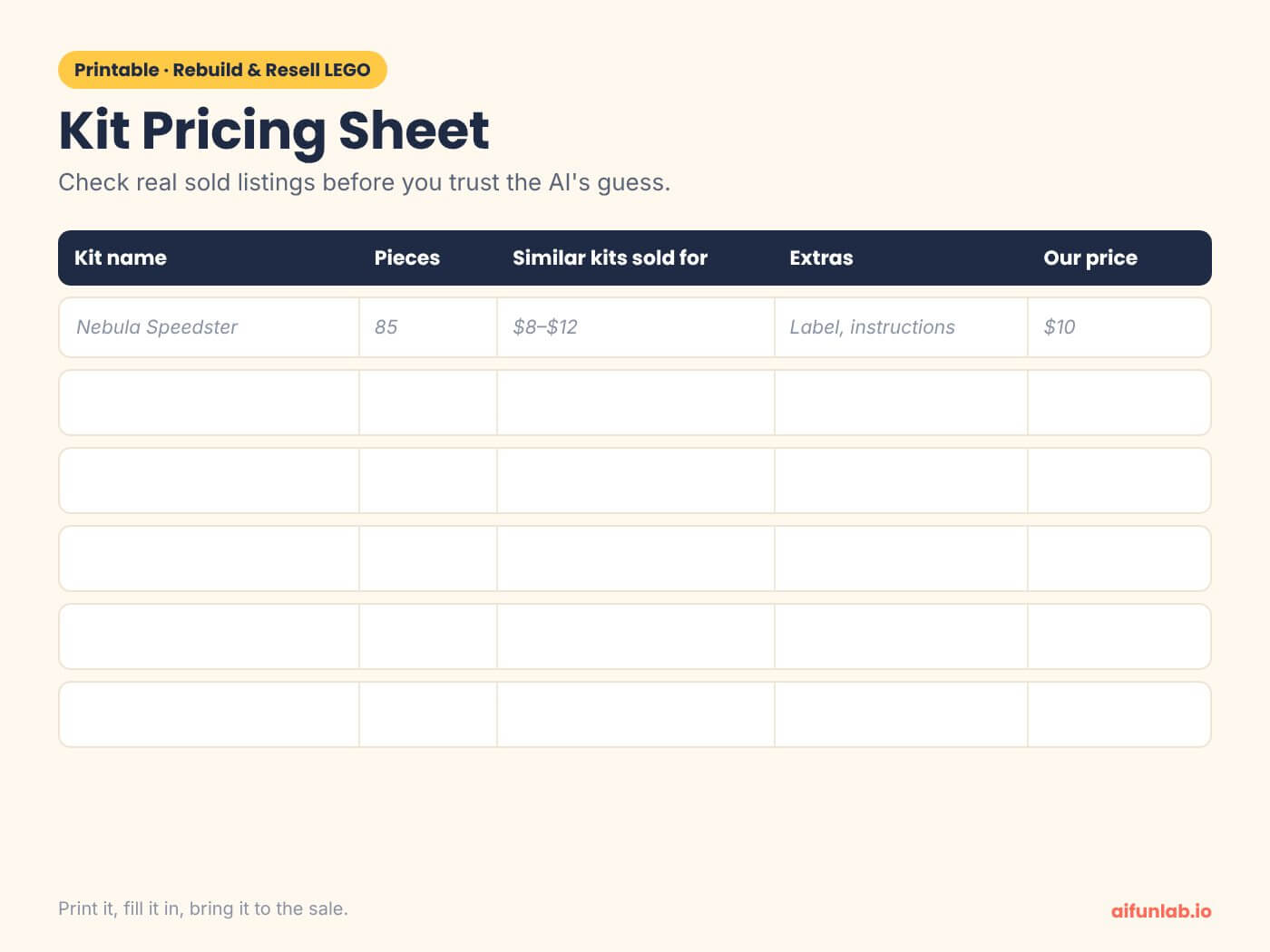
- Fill in a pricing table. Your kid writes one row per kit on paper or in a spreadsheet:
| Kit name | Pieces | Similar kits sold for | Extras | Our price |
|---|---|---|---|---|
| Nebula Speedster | 85 | $8–$12 | Printed instructions, label | $10 |
| Emerald Dragon | 140 | $12–$18 | Name card, box | $15 |
| Bundle: both kits | 225 | — | Bundle discount | $22 |
- Write the listing. Your kid drafts it, then asks the AI: "Make this clearer and shorter, but keep my words." Include the piece count, that the bricks are used and whether every piece was checked. Leave out your kid's name, school and address.
Sell it safely
- Pick where to sell.
- Family and friends first: a yard sale, a school craft fair or relatives are the easiest first customers.
- A local LEGO store: Bricks & Minifigs stores buy loose bricks and sets for cash or store credit. Call your local store first to ask whether they'll take rebuilt kits.
- Online: a parent posts the listing on Facebook Marketplace or eBay, both 18+. Meet buyers in a public place, or use a police station's safe exchange spot if your town has one.
- Keep a simple ledger. Write down each sale, the price and what it cost you. At the end, your kid works out the profit and decides what to do with it. For another first business, try the AI lemonade stand plan next.
Parent tip
The screen time is short: a few minutes of scanning and a few minutes with the AI. The building, sorting, pricing and selling take an afternoon or two. If a kit doesn't sell, donating it to a local shelter or children's hospital toy drive is a good ending too. For more quick, low-screen ideas, here are 10 no-prep AI activities kids can start today.
FAQ
Is Brickit still free in 2026?
Yes, to start. As of October 2026 Brickit is free on the App Store and Google Play, rated 4+ on iPhone. An optional Brickit Pro subscription unlocks advanced features; the US App Store lists it at $6.99 a month, with yearly plans also available. The Android version shows ads. Brickit isn't an official LEGO product.
Can a kid sell LEGO on Facebook Marketplace or eBay?
Not on their own. Facebook Marketplace is for users 18 and older, and eBay's user agreement doesn't allow people under 18 to use the service. A parent posts the listing on their own account and handles messages, payment and meetups, while the kid writes the listing and sets the price. For older kids who want a real paycheck, here's paid work for Bay Area teens, sorted by age. Paid teen programs recruit on set cycles, so check the teen program deadlines early.
Can ChatGPT tell me what my LEGO is worth?
It can give a starting guess and explain its reasoning, but it can be wrong. Use the AI's price as a first draft, then compare it with recently sold listings for similar used LEGO. That check is a good business lesson: data from real sales beats a confident guess. If your kid enjoys catching the AI being wrong, try a round of Outsmart the AI.
Sources
Checked October 2026.




%20(300%20x%20250%20px)%20(1).avif)