Can kids learn machine learning without coding?
What You'll Need
- A laptop or desktop computer with a working webcam, using Chrome or Safari
- Google Teachable Machine — free, browser-based, no account or download needed: teachablemachine.withgoogle.com
- A clear space to move — at least 6 feet of open floor in front of the webcam
- A helper to hold poses (or a tripod if working solo)
- Optional: bright, contrasting clothing against a plain wall background — makes it much easier for the AI to detect body shape differences between poses
Heads up
Gymnastics moves need room. Clear at least 6 feet of open floor in front of the webcam and have a helper nearby while your child holds each pose.
New to Google Teachable Machine? Start with our AI Puppy Detective project first — it uses the same tool to train an image recognition model using pet photos, and takes just 15 minutes. Once you understand how training works, this gymnastics pose project will make much more sense.
How to Do It
Step 1 — Open Teachable Machine and start an image project
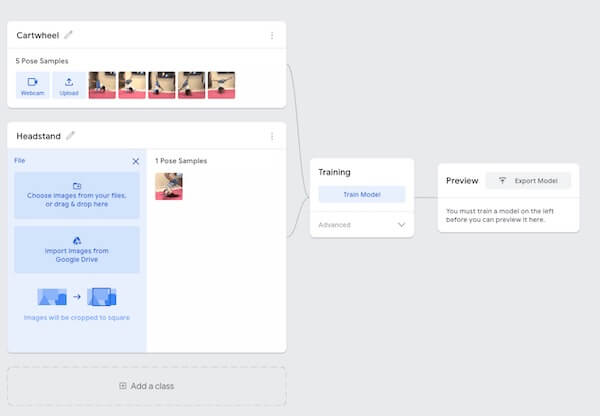
Go to teachablemachine.withgoogle.com and click "Get Started." Choose "Image Project" then "Standard image model." You'll see two default classes, Class 1 and Class 2. Click "Add a class" for each additional pose.
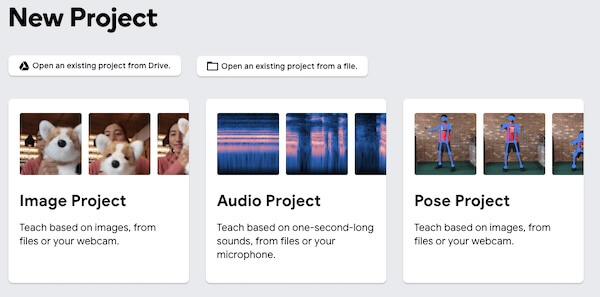
Step 2 — Name your pose classes
Click the pencil next to each class name and rename it to match the move you're teaching the AI:
- Class 1: Egg Roll
- Class 2: Cartwheel
- Class 3: Back Bridge (if testing)
- Class 4: Back Handspring (if testing)
- Add a "Standing Still" class — this is important as your neutral/baseline pose so the AI has something to compare against when no move is being performed
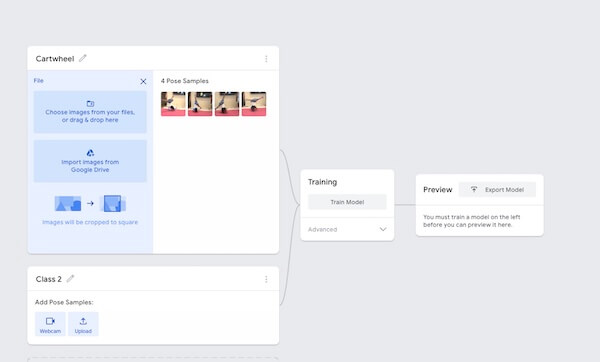
Step 3 — Gather your training photos for each pose
Click "Webcam" under Class 1 (Egg Roll). Get into the egg roll position and hold it. Press and hold "Hold to Record" to take at least 30 photos. During recording:
- Shift your position slightly between shots — angle left, angle right, slightly closer, slightly further
- Try the pose from slightly different distances from the webcam
- Wear the same outfit throughout one session — the AI may pick up clothing color as a feature if you change between poses
Repeat for every class. Aim for at least 30 photos per class. More varied photos usually give better results.
Step 4 — Train your model
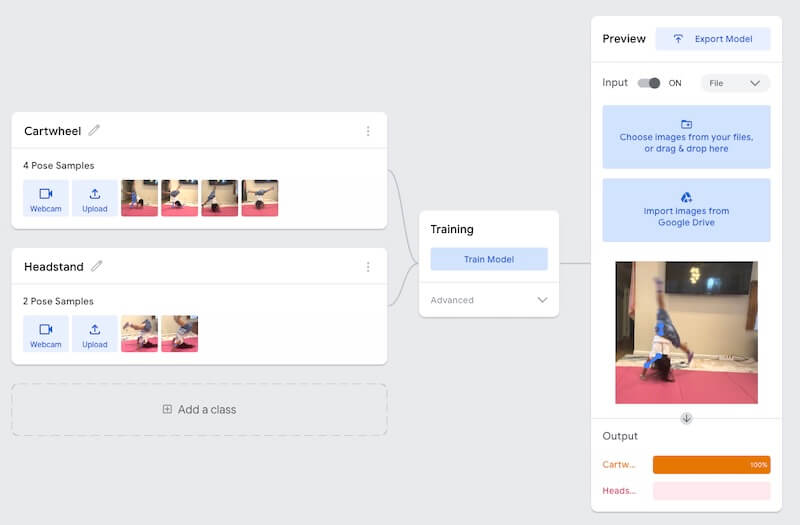
Click "Train Model." The AI will process all your photos and learn the visual patterns that distinguish each pose. This usually takes a minute or two, longer with more photos and classes. Keep the tab open until it finishes, because switching tabs can pause training.
Parent tip
The teaching moment here: explain to your child that this is the "brain building" step — the computer is looking at thousands of tiny differences between the egg roll shape and the cartwheel shape and creating rules to tell them apart.
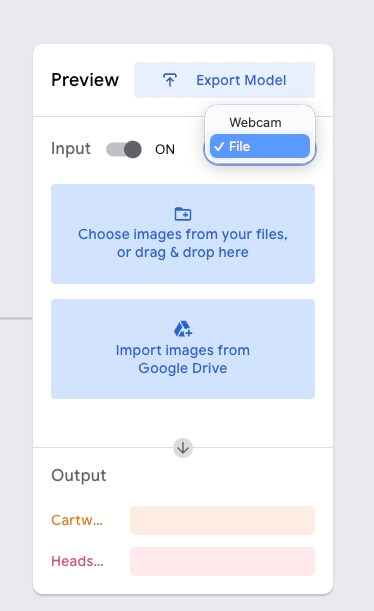
Step 5 — Test it live
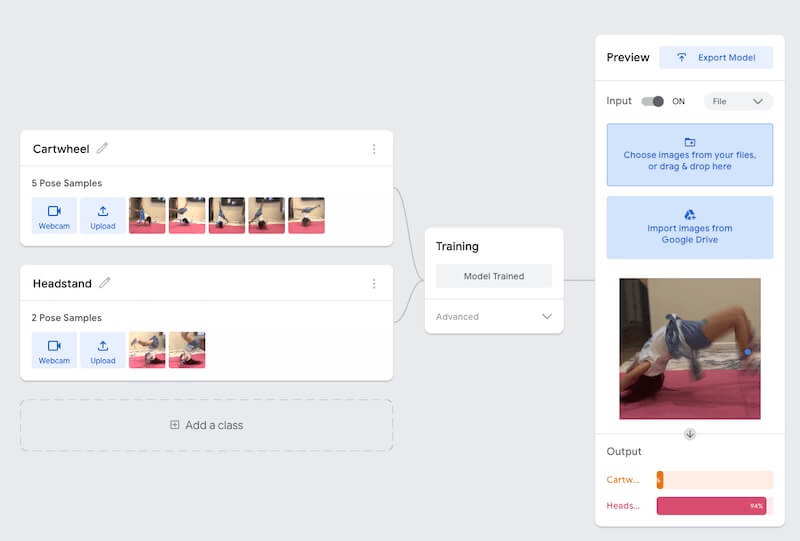
Once training is complete, the Preview panel turns on your webcam and the AI starts identifying poses in real time. You can also switch the input to File and test a photo. Have your child strike each pose and watch the confidence percentage bars change.
Try these tests to deepen the learning:
- The Imposter Test: Have a parent try the same poses — does the AI still recognize them? (It might not if it learned your child's specific body proportions.)
- The Hybrid Test: Do a move that's halfway between two poses — watch the AI show split confidence
- The Retrain Test: Add 10 more photos of a pose the AI keeps getting wrong — does accuracy improve?
Step 6 — Export or screenshot your results
Teachable Machine lets you export your model with the "Export Model" button, or save the whole project to Google Drive or as a file from the menu. For this activity, a screenshot of the prediction bars during each correct identification is the perfect "proof of learning" to share or save.
The Teaching Moment - What to Tell Your Child After Each Step
| Step | What the AI is doing | How to explain it |
|---|---|---|
| Photo collection | Building a dataset | "We're showing the computer lots of examples so it learns what each move looks like." |
| Training | Building the model | "The computer is finding patterns, like noticing that egg rolls make a round shape and cartwheels make a star shape." |
| Testing wrong predictions | Model error | "The AI made a mistake because it didn't have enough examples of that angle, just like you need to practice a new move many times." |
| Retraining | Improving the model | "We gave it more examples and it got better. That's how people who build AI improve their models." |
Parent tip
Teachable Machine also has a Pose Project, which tracks a stick figure of the body instead of the whole picture. For a bonus round, train the same moves there and compare: which one handles upside-down moves like the cartwheel better? Our Dance Move Judge project walks through the Pose Project step by step.
FAQ
Is this the same as Machine Learning for Kids (machinelearningforkids.co.uk)?
No. This project uses Google Teachable Machine, which is free, runs in the browser and needs no account or download. Machine Learning for Kids is a separate tool created by Dale Lane at IBM. Kids train models on text, pictures, numbers or sounds and then use them in Scratch projects.
Does my child need an account or coding skills for this AI project?
No. Teachable Machine is free and browser-based, with no account, download or code needed. Your child trains the model by recording webcam photos of each pose and clicking "Train Model." Training happens on your computer, and the photos stay there unless you save the project to Google Drive.
Explore More AI Projects
Enjoyed building your first pose recognition model? Here's where to go next depending on what sparked your child's curiosity:
- 🐶 Just getting started with Teachable Machine? → AI Puppy Detective: Train a Computer to Recognize Your Dog — the simplest entry point, ages 7+
- 🎯 Ready to explore pre-built AI rather than training from scratch? → AI Face Recognition Game for Elementary Kids — uses PictoBlox's pre-trained emotion detection, no training required
- 📖 Want to understand the bigger picture? → Machine Learning for Kids: Free Tools & Activities Guide — the parent guide covering how machine learning works, which tools to use by age, and what equipment your child actually needs
Sources
Checked October 2026.



%20(300%20x%20250%20px)%20(1).avif)


-min.avif)